
By using this site, you agree to the Privacy Policy and Terms of Use.
Accept
The Pixel PakistanThe Pixel PakistanThe Pixel Pakistan
Font ResizerAa
  • Home
  • Exclusive
  • Tech
  • Political
  • News
  • Fashion
  • Business
  • Sports
  • Music
  • Films
Reading: Why WhatsApp Two-Step Verification Is Essential -Full Guide
Font ResizerAa
The Pixel PakistanThe Pixel Pakistan
  • Home
  • Tech
  • Political
  • Sports
  • News
  • Fashion
  • Contact
  • Privacy Policy
  • Terms & Conditions
Search
  • Home
  • Exclusive
  • Tech
  • Political
  • News
  • Fashion
  • Business
  • Sports
  • Music
  • Films

Trending →

Google Launches “Disco” AI-Powered Browser That Converts Browsing Sessions Into Instant Web Apps

By
Syed Mehmood
December 12, 2025

ChatGPT Now Embeds Adobe Creative Apps, Democratizing Design Without Traditional Skill Barriers

By
Syed Mehmood
December 12, 2025

Pakistan Virtual Assets Regulatory Authority Grants NOC to Binance and HTX

By
Syed Mehmood
December 12, 2025

PTCL Warns of 36-Hour Slowdown on Facebook, WhatsApp and Instagram

By
Syed Mehmood
December 11, 2025

PQFTL book building starts 11th December

By
The Pixel Pakistan Publisher
December 10, 2025
Follow US
© 2025 The Pixel Pakistan. All rights reserved.
whatsapp two step verification
Tech

Why WhatsApp Two-Step Verification Is Essential -Full Guide

Syed Mehmood
Last updated: November 8, 2025 9:28 pm
By
Syed Mehmood
Share
4 Min Read
SHARE
chrome

In Pakistan, WhatsApp is more than just a messaging app — it’s a vital platform for personal, professional, and business communication. With this growing reliance comes a greater need for security. Enabling Two-Step Verification (2SV) on WhatsApp is one of the simplest and most powerful ways to safeguard your account from hijacking or unauthorized access.

Contents
  • Why Two-Step Verification Matters
    • 1. Prevents Account Hijacking
    • 2. Protects Personal & Business Data
    • 3. Shields Against Local Scams & SIM Swaps
    • 4. Simple Setup, Long-Term Security
  • How to Enable WhatsApp Two-Step Verification
    • Step 1: Open WhatsApp → Go to Settings
    • Step 2: Open Account Settings
    • Step 3: Enable Two-Step Verification
    • Step 4: Add a Recovery Email (Optional but Recommended)
    • Step 5: Confirmation
  • Managing Two-Step Verification
  • Best Security Practices for WhatsApp Users in Pakistan

Why Two-Step Verification Matters

1. Prevents Account Hijacking

If someone gets hold of your SIM or intercepts your SMS verification code, they can register your WhatsApp number on another phone. Two-Step Verification blocks this by adding a six-digit PIN that only you know. Without that PIN, even someone with your SIM cannot activate your account elsewhere.

2. Protects Personal & Business Data

Your WhatsApp account contains messages, photos, business chats, contact lists, and groups. Losing access could mean losing sensitive information or having someone impersonate you. The 2SV PIN ensures only you can authorize account setup.

3. Shields Against Local Scams & SIM Swaps

In Pakistan, cases of WhatsApp-based scams and SIM-swap attacks are rising. Attackers often impersonate WhatsApp support or use cloned numbers. Two-Step Verification adds an unbreakable layer, keeping your account locked even in these cases.

4. Simple Setup, Long-Term Security

Enabling 2SV takes less than two minutes but protects you permanently. It’s a one-time setup that continuously shields your chats and identity.


How to Enable WhatsApp Two-Step Verification

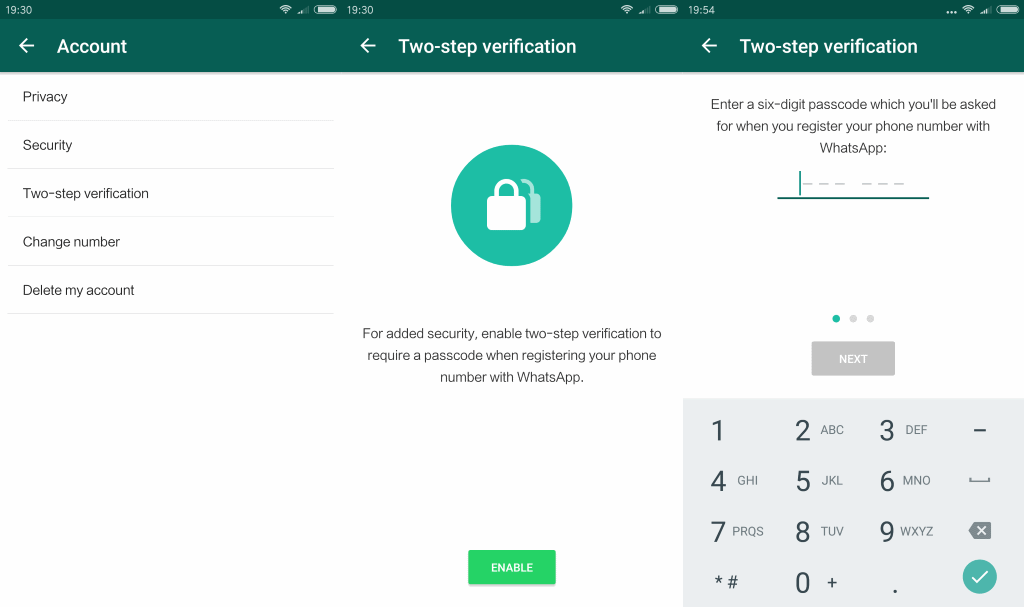
Here’s how to activate 2SV using a typical Android interface used in Pakistan.

Step 1: Open WhatsApp → Go to Settings

  • Launch WhatsApp.
  • Tap the three dots (⋮) in the top-right corner.
  • Select Settings (ترتیبات).

Step 2: Open Account Settings

  • Inside Settings, tap Account (اکاؤنٹ).
  • Select Two-step verification (ٹو-اسٹیپ ویریفیکیشن).

Step 3: Enable Two-Step Verification

  • Tap Enable (فعال کریں).
  • Enter a six-digit PIN of your choice.
  • Confirm the PIN once again.
  • Choose something memorable but not predictable — avoid “123456” or birth years.

Step 4: Add a Recovery Email (Optional but Recommended)

  • WhatsApp will ask for an email address to recover your PIN in case you forget it.
  • Enter a valid email that you actively use.
  • You can skip it, but without this email, recovery becomes difficult if you forget the PIN.

Step 5: Confirmation

  • Once set up, WhatsApp will show “Two-Step Verification Enabled”.
  • From now on, anyone trying to register your number will need both the SMS code and your PIN.

Managing Two-Step Verification

You can manage or update your settings anytime:

  1. Open Settings → Account → Two-step verification
  2. Tap to Change PIN, Add/Change Email, or Disable the feature if needed.

WhatsApp may occasionally ask you to enter your PIN to ensure you remember it — this is normal and part of its security design.


Best Security Practices for WhatsApp Users in Pakistan

  • Never share your SMS verification code or PIN with anyone, even if they claim to be WhatsApp support.
  • Use a screen lock (PIN, pattern, fingerprint) to prevent physical access.
  • Keep your recovery email secure with its own strong password and 2FA.
  • Regularly update WhatsApp via the Google Play Store to ensure you have the latest security patches.
  • If you change your number, re-enable 2SV on the new number.
  • Avoid sharing screenshots of your PIN setup or recovery options.

In Pakistan, where WhatsApp is used for everything from business transactions to family conversations, enabling Two-Step Verification is essential. It’s your strongest defense against hacks, impersonation, and data theft.

Take two minutes today to enable it — and make your WhatsApp truly yours, and yours alone.

Share This Article
Facebook Whatsapp Whatsapp Threads Copy Link
What do you think?
Love0
Sad0
Happy0
Angry0

Follow Us

- Advertisement -

The Pixel Pakistan

More

Google Disco AI Browser GenTab 1068x601 ezgif.com webp to jpg converter
Google Launches “Disco” AI-Powered Browser That Converts Browsing Sessions Into Instant Web Apps
Tech
media 15d631a2f2b908e1ebffd15a9cd75d6d591838062
ChatGPT Now Embeds Adobe Creative Apps, Democratizing Design Without Traditional Skill Barriers
Tech
pakistan virtual assets regulatory authority grants noc to binance and htx techjuice 207573 122621 940x663 1
Pakistan Virtual Assets Regulatory Authority Grants NOC to Binance and HTX
Economy Tech
ptcl sms on meta maintenance fuels questions after reported service slowdowns techjuice 207122 071130 940x470 1
PTCL Warns of 36-Hour Slowdown on Facebook, WhatsApp and Instagram
Tech

Top 10 Coins

  • bitcoinBitcoin$90,242.00-0.14%
  • ethereumEthereum$3,115.060.92%
  • tetherTether$1.00-0.01%
  • binancecoinBNB$896.291.63%
  • rippleXRP$2.020.58%
  • usd-coinUSDC$1.000.02%
  • solanaSolana$133.070.31%
  • staked-etherLido Staked Ether$3,114.270.88%
  • tronTRON$0.271014-1.02%
  • dogecoinDogecoin$0.1391251.53%
Powered by CoinGecko API

You Might Also Like ↷

5845163514534a8b491120f077508a16

OpenAI Founder’s Deposition Exposes Internal Power Struggles and Secret Anthropic Merger Talks

By
Syed Mehmood
November 4, 2025
PHOTO 2024 05 10 17 28 27

PTCL Flash Fiber Ranked Best Fixed Internet Provider in Pakistan — Ookla

By
Syed Mehmood
September 30, 2025
Spotify GPT

Spotify Now in ChatGPT, Turning Your Prompts Into Personalized Picks

By
Syed Mehmood
October 9, 2025
Slow internet in Pakistan

How to Check If Your Internet Is Slow Because of Your Provider or a National Issue in Pakistan

By
Syed Mehmood
September 16, 2025

Always Stay Up to Date

Subscribe to our newsletter to get our newest articles and deals instantly!
  • Write For Us
  • Careers
  • Advertise with us
  • Contact
Pixel Pakistan is the voice of today and the vision of tomorrow, a platform that frames the evolving picture of our nation with clarity and depth. More than just news, it is a space where truth, inquiry, and understanding come together to inspire fresh perspectives and progress.
The Pixel Pakistan
393.9kFollowersLike
34.3kFollowersFollow
InstagramFollow
4.42MSubscribersSubscribe
TiktokFollow
30.4kFollowersFollow
LinkedInFollow
RSS FeedFollow

© 2025 The Pixel Pakistan. All rights reserved.

  • Terms & Conditions
  • Privacy Policy
  • About Us