


In Pakistan, WhatsApp is more than just a messaging app — it’s a vital platform for personal, professional, and business communication. With this growing reliance comes a greater need for security. Enabling Two-Step Verification (2SV) on WhatsApp is one of the simplest and most powerful ways to safeguard your account from hijacking or unauthorized access.
Why Two-Step Verification Matters
1. Prevents Account Hijacking
If someone gets hold of your SIM or intercepts your SMS verification code, they can register your WhatsApp number on another phone. Two-Step Verification blocks this by adding a six-digit PIN that only you know. Without that PIN, even someone with your SIM cannot activate your account elsewhere.
2. Protects Personal & Business Data
Your WhatsApp account contains messages, photos, business chats, contact lists, and groups. Losing access could mean losing sensitive information or having someone impersonate you. The 2SV PIN ensures only you can authorize account setup.
3. Shields Against Local Scams & SIM Swaps
In Pakistan, cases of WhatsApp-based scams and SIM-swap attacks are rising. Attackers often impersonate WhatsApp support or use cloned numbers. Two-Step Verification adds an unbreakable layer, keeping your account locked even in these cases.
4. Simple Setup, Long-Term Security
Enabling 2SV takes less than two minutes but protects you permanently. It’s a one-time setup that continuously shields your chats and identity.
How to Enable WhatsApp Two-Step Verification
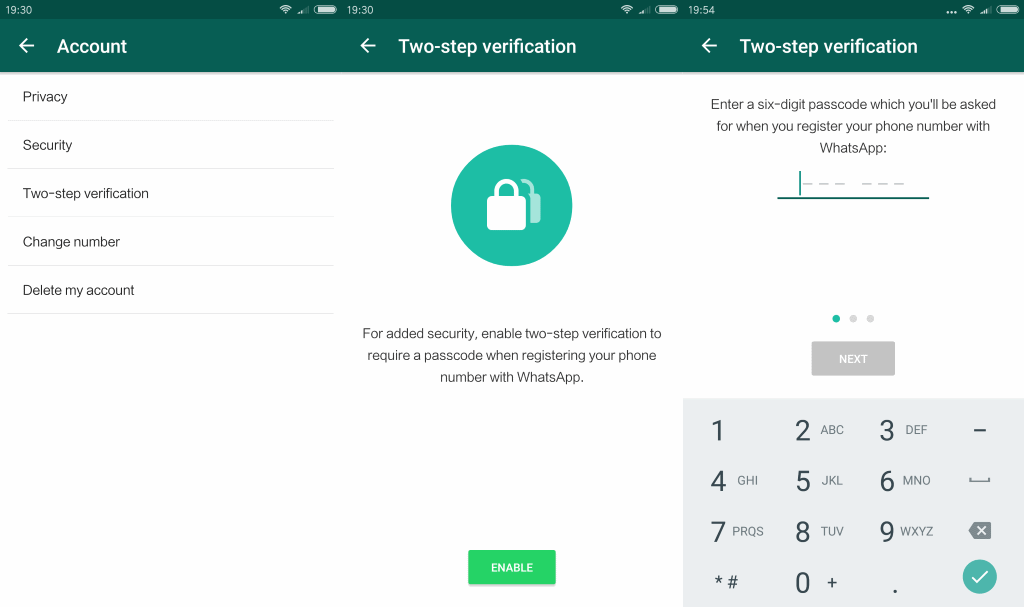
Here’s how to activate 2SV using a typical Android interface used in Pakistan.
Step 1: Open WhatsApp → Go to Settings
- Launch WhatsApp.
- Tap the three dots (⋮) in the top-right corner.
- Select Settings (ترتیبات).
Step 2: Open Account Settings
- Inside Settings, tap Account (اکاؤنٹ).
- Select Two-step verification (ٹو-اسٹیپ ویریفیکیشن).
Step 3: Enable Two-Step Verification
- Tap Enable (فعال کریں).
- Enter a six-digit PIN of your choice.
- Confirm the PIN once again.
- Choose something memorable but not predictable — avoid “123456” or birth years.
Step 4: Add a Recovery Email (Optional but Recommended)
- WhatsApp will ask for an email address to recover your PIN in case you forget it.
- Enter a valid email that you actively use.
- You can skip it, but without this email, recovery becomes difficult if you forget the PIN.
Step 5: Confirmation
- Once set up, WhatsApp will show “Two-Step Verification Enabled”.
- From now on, anyone trying to register your number will need both the SMS code and your PIN.
Managing Two-Step Verification
You can manage or update your settings anytime:
- Open Settings → Account → Two-step verification
- Tap to Change PIN, Add/Change Email, or Disable the feature if needed.
WhatsApp may occasionally ask you to enter your PIN to ensure you remember it — this is normal and part of its security design.
Best Security Practices for WhatsApp Users in Pakistan
- Never share your SMS verification code or PIN with anyone, even if they claim to be WhatsApp support.
- Use a screen lock (PIN, pattern, fingerprint) to prevent physical access.
- Keep your recovery email secure with its own strong password and 2FA.
- Regularly update WhatsApp via the Google Play Store to ensure you have the latest security patches.
- If you change your number, re-enable 2SV on the new number.
- Avoid sharing screenshots of your PIN setup or recovery options.
In Pakistan, where WhatsApp is used for everything from business transactions to family conversations, enabling Two-Step Verification is essential. It’s your strongest defense against hacks, impersonation, and data theft.
Take two minutes today to enable it — and make your WhatsApp truly yours, and yours alone.